To get the best results from GoToMyPC (GTMP), please do the following:
When done with GTMP, before leaving it, close all apps that are open (Word, Outlook, Excel, Access, web browser, etc.) on your work PC. Clear everything that is open – click the x on each application to close it.
Close GTMP if you aren’t going to use it for a while, and when you do, close it after closing all the apps on your CPCS PC.
If you just need access to your email, please use outlook.office365.com webmail rather than GTMP
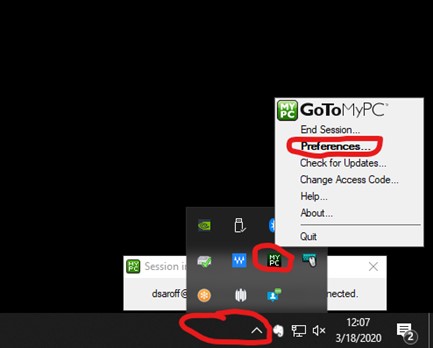
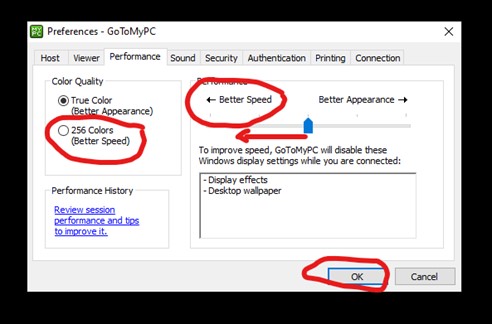
Modify performance settings for better performance. When on GTMP, go to the GTMP icon in your work PC tool bar and modify performance settings (see images, below).
If you don’t like how GTMP presents on your device, you change change this with this. When you use GTMP, in the menu bar at the top, there is a menu called “View”, which gives you some viewing options. By default it is set for “Actual Size.” Depending on your screen or what you’d like to do “zoom to” or “scale to fit” may be the options to try.