Agency staff sometimes receive emails that look like they are coming from other staff members. This is a classic form of phishing attack.
See these examples with the tip-offs that they are bad.
Also, at the end are also some rules for fighting phishing and an anti-phishing tip-sheet you should print out and have handy at your desk.
In general, be suspicious and vigilant of any email no matter who it is from. Be especially vigilant if it has an unexpected attachment or link. Don’t respond to a phishing email, because that will alert them that there is a potential target at the other end.
Example 1: Email received by one of my staff:

TIP-OFFS to a Phishing attack
- King, Kasey – who is he and why is he emailing one of my staff
- Email address – nothing related to CPCS or any vendor the recipient works with
- Subject: “for all” – generic subject is a big tip-off that something is a fake
- “hopefully you will appreciate this” – generic, no context, meaningless – big tip-off
- The Web address – nothing relating to CPCS. AN UNSOLICITED LINK (dangerous)
Example 2: An email received by me from “Anthony.”

TIP-OFFS to a Phishing attack
- “Anthony’s” email address is a gmail address, not CPCS (and a strange one at that)
- Subject is “Request” – generic, non-informative
- Body text is equally generic
This sort of email is intended to see if there is someone “alive” at the other end (e.g., does someone respond, ‘I’ll be right there, Anthony.’). If you respond, you’ve just tagged yourself as being susceptible to phishing attacks (i.e., you didn’t notice this strange email address for “Anthony,” so what else won’t you notice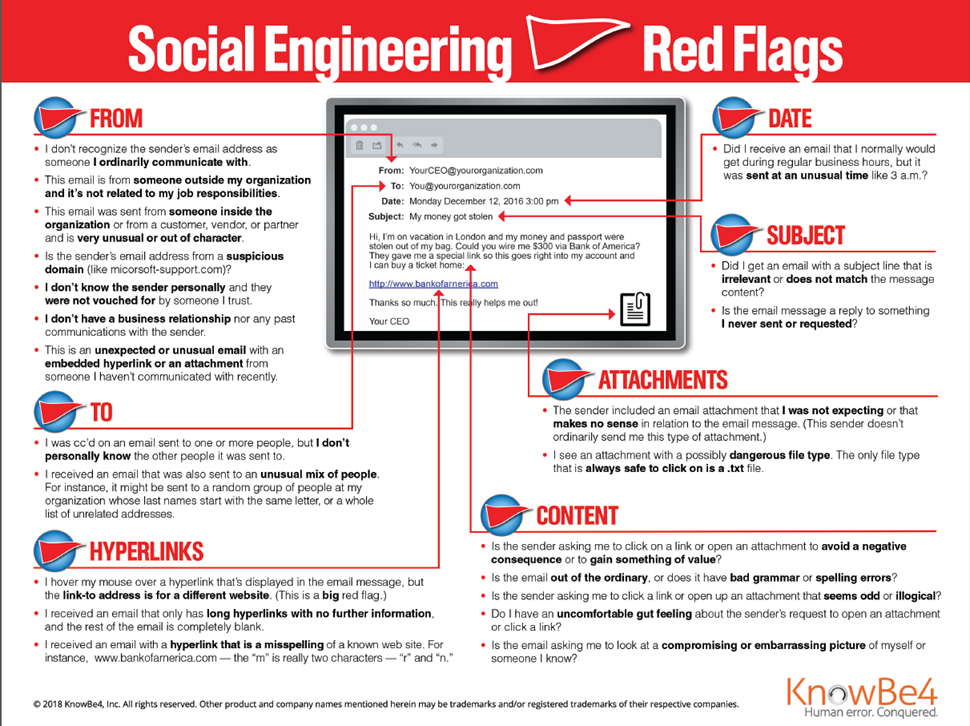 ). They then follow-up with more serious attacks.
REMEMBER THE RULES OF FIGHTING PHISHING:
- Don’t trust links or attachments
- Just because the email address looks legitimate doesn’t mean it is
- If you aren’t expecting an email with a link or attachment, call (don’t use the phone number in the email) or email (through a separate email to their normal address) the person to ask if it is legitimate. Don’t click until you are sure
- Make sure the email address or URLs aren’t mis-spelled.
- Misspellings are used to trick people into clicking a seemingly legitimate URL that isn’t, e.g., micrsoft.com (missing “o”) or rnicrosoft.com (notice the “m” in this is actually an “r” and an “n” next to each other, because it looks like an “m”)
- Hover your cursor over the web link to see the URL. If the URL looks funny, don’t click and go to #3
- If you aren’t sure if it is legitimate, don’t even reply in an email. Replying is not harmless; it can mean there is a fish at the end of the hook.